Author

Hunter Wightman

Browsing

Mobile operation trailers offer organisations mobile workspaces that can be set up where they are needed more than ever. They can assist with emergency response, public safety, event management, utilities, construction or any other field operations. These trailers need to be designed around the teams that use them to be effective. With careful consideration, communications, coordination, and decision-making may be enhanced in challenging settings.

To achieve peak performance during critical missions, taking a strategic approach to Designing Mobile Operations Trailers Smarter ensures every square foot serves a clear functional purpose. Rather than relying on generic, off-the-shelf configurations, custom-tailored command units prioritize user workflow, seamlessly balancing ergonomic spacing with technical functionality. By focusing on intentional layout choices and operational priorities from the outset, organizations can bridge the gap between temporary field deployment and long-term operational resilience.

Start from Operational Requirements

The design process should begin by determining the uses for the trailer. Various combinations of workstations, communications systems, storage areas, meeting rooms and technical equipment are required depending on different operations. Gaining an understanding of the mission will ensure that the final design will serve true operational needs, rather than having unnecessary features.

Develop an efficient interior layout.

Inside should be comfortable for people to work and be able to communicate with each other. The layout of workstations, displays, equipment racks, storage areas and collaboration spaces should be logical. A good organisation can minimise the need for unnecessary travel and provide expedient access to key information in the team.

Support Reliable Connectivity

Teams in the field frequently have to communicate with other people in the trailer, or other personnel outside the trailer. The mobile operations trailers will therefore need to have access to a reliable internet system, radio system, cellular coverage, satellite communications or other network solutions. Making effective communications flexible can ensure that team members stay connected, even across great distances.

Plan for Power and Climate Control

Technology and workers need to be able to operate reliably in a comfortable working environment. Power systems should be sized to accommodate any required equipment, and backup should be provided to run the system during outages. For extended periods of field use, effective heating, cooling, ventilation and insulation are also significant.

Integrate Technology Thoughtfully

Technology should facilitate – not complicate – coordination. Displays, mapping tools, data systems, video feeds and communication equipment should be combined in a way that allows the information to be readily available and accessible. Future changes to operational requirements should also be permitted by systems.

mobility and deployment.

A mobile operations trailer should be easily moveable, positionable, and set up. During design, several factors need to be taken into account, including weight, towing requirements, access, stabilisation and deployment time. Efficient deployment enables teams to start operating faster.

Focus on durability & security

Trailers and equipment can be put under harsh conditions in the field. Robust building structure, weatherproofing, safe storage and access control can be used to help keep people and technology safe. The characteristics are essential for long-term trustworthy operation.

Conclusion:

In the end, a mobile operations trailer for smarter field coordination is all about mobility, technology, comfort, and simplicity. Operational needs analysis, designing efficient layouts, facilitating reliable connectivity, and addressing dynamic conditions in the field, to facilitate the creation of mobile workspaces that enhance coordination and decision-making across the board.

TL;DR

A simulated world buys you volume and speed at almost no cost per episode. Real data buys you the truth about how your robot behaves on contact. The right split is rarely fifty fifty. It moves with three things: how rich the task is, how much a failed deployment costs you, and how much your policy already generalizes. Fund simulation for breadth. Gate real data to the exact places sim cannot reach. Then prove the ratio next cycle with deployment numbers, not opinions.

Direct answer

How should you split a robot training budget between a simulated world and real data? Start near 70/30 in favor of simulation for simple, low stakes tasks. Push the real data share toward 50 percent or higher as contact complexity and cost of failure rise. Three variables set your number: task contact richness, deployment stakes, and the generalization your policy already banked.

You have one budget line and two people fighting over it. The simulation team promises millions of episodes for the price of a few GPUs. The data team keeps saying the simulated world will lie to you the moment your robot touches something real. Both are right. That is what makes the call hard.

And the cost of guessing wrong is not small. Overfund simulation and you ship a policy that looks flawless on screen, then fumbles the first wet cloth or loose screw it meets. Overfund real collection and you burn months of runway gathering episodes a generative environment could have made for free. Either mistake bills you twice. Once to build the wrong thing, again to fix it.

So this post skips the “which one wins” debate. Nobody wins. You are dividing money, not picking a team. What follows is a way to set the split, defend it in a budget meeting, and prove it right the next quarter. Let us get into math.

What a simulated world actually pays for

A simulated world is a software environment, built on a physics engine or a generative model, where your robot practices tasks that would be slow, costly, or dangerous to run for real. Think MuJoCo, NVIDIA Isaac Sim, or the newer generative environments that render scenes from a prompt. The pitch is simple. A robot can fail ten thousand times in software before it ever touches hardware.

Here is what that money genuinely buys you:

  • Breadth. Millions of episodes across lighting, textures, and object positions you would never stage by hand.
  • Edge cases. The rare, ugly situations that break policies, produced on demand instead of waited for.
  • Safe exploration. A dropped part or a wall collision costs nothing in a simulator.
  • Reproducible evaluation. The same test, run the same way, every checkpoint.

The results back this up. In one 2026 study, a generative 3D world paired with domain randomization lifted real world task success from 21.7 percent to 75 percent. Synthetic training data is not a toy anymore. It moves real deployment numbers.

But the money leaks in quiet places. Building the environment takes real engineering time. The simulated world has a diversity ceiling set by whoever designed it. And the physics is approximated, which is exactly why the sim-to-real gap exists. So cost your simulation by build plus maintenance, not by episode count. Episodes look free. The world that makes them is not.

What real data actually pays for

Real data buys the one thing simulation cannot fake: the truth of contact. The friction, the sensor noise, the way a soft object deforms in a grip, the long tail of physical events no engine renders perfectly. This is true deployment truth, and it is expensive because it is real.

It stays costly for honest reasons. Collection takes time. It needs hardware and human oversight. For contact rich tasks it can be slow and occasionally unsafe. So teams look at the per episode price next to simulation and conclude real data is “too expensive.”

That comparison is broken. You are not buying episodes. You are buying deployment success. Priced per working deployment, real data is often the cheaper line, because it closes the exact gaps that send a policy back for a second training run. Treat the real data budget as insurance against redeployment cost. Estimate what one failed rollout costs you in engineering time and lost trust, then size the line against that number, not against sim.

The 2026 research makes the point sharply. One co-training method reached 62.5 percent out-of-distribution success with just 80 real demonstrations, beating a real only baseline by more than seven times. A small, well placed dose of real data did the heavy lifting. That is the shape of a smart split.

The split is not fifty fifty: three variables that set your ratio

Stop reaching for a default ratio. Your number falls out of three questions. Answer them honestly and the split writes itself.

1. Contact richness of the task

Free space motion, like navigation or reaching, tolerates a sim heavy split. The physics that matters is easy to model. But insertion, deformable handling, and anything with sustained contact demands a heavier real data share, because those are the physics a simulated world approximates worst. The more your task lives at the point of contact, the more real data you buy.

2. Deployment stakes

What does one failure cost? A missorted parcel is cheap. A dropped payload on a factory line, or a humanoid stumbling near a person, is not. High stakes pull budget toward real data regardless of task type, because you are paying for confidence you cannot get from approximated physics alone.

3. Generalization you already banked

A policy sitting on a strong pretrained base needs less real data at the margin than one starting cold. If you inherit a foundation model that already generalizes, a thin layer of real fine-tuning goes a long way. Start from scratch and the real data share climbs. Know what you already have before you buy more.

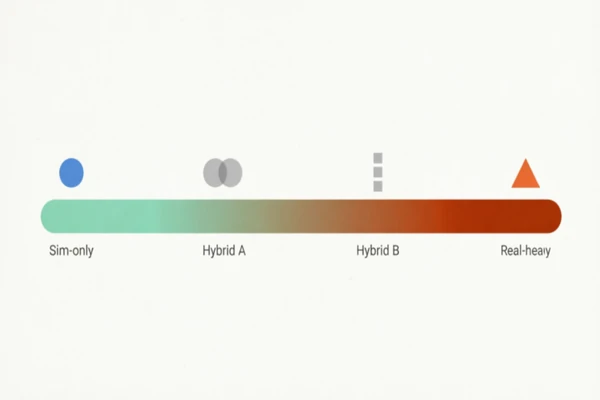
Put those three together and you get a starting ratio, not a guess. The table below turns the framework into numbers you can walk into a meeting with.
Article image

Task profile Starting sim : real What moves it
Navigation, free space reaching, low stakes 80 : 20 Raise real share if the deployment site differs sharply from your sim scenes.
Pick-and-place, moderate contact, moderate stakes 70 : 30 Contact variety and object diversity push reality up.
Insertion, assembly, sustained contact 55 : 45 Tight tolerances and rigid safety limits push real toward parity.
Deformable handling, high stakes, near people 50 : 50 or heavier on real The cost of failure dominates. Fund real until confidence holds.

These are starting points, not laws. The table is your first draft. The next cycle of deployment data is your editor.

Turn the ratio into a budget you can defend

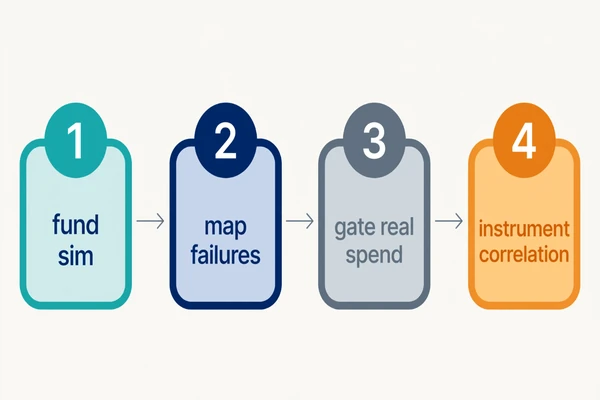
A ratio is not a budget until it becomes line items your finance lead accepts. Here is the sequence that holds up under questions.

  1. Fund the simulated world first, for breadth. Buy the volume and edge case coverage only simulation gives you cheaply.
  2. Map your failure surfaces. Run the sim trained policy and find where it breaks. Those specific gaps are your real data shopping list.
  3. Gate the real data spent on those surfaces. Do not buy real data broadly. Buy it exactly where the simulated world falls short.
  4. Instrument the correlation. Track how simulated performance predicts real performance. When the two track closely, you can trust more of your budget to sim next cycle. When they diverge, shift money to real.

This sequencing is why the framing in the field has shifted. In 2026 the honest answer is that simulation, teleoperation, and human video are a stack, not a choice, weighted to the deployment target, the embodiment, and the budget. Your split is the weighting. Instrumentation is how you correct it.

Before you release the real data budget, run this quick check: do you know the exact failure surface it targets, the deployment cost it offsets, and the metric that will tell you it worked? Three yeses and you spend. A no means you are buying real data on faith, which is how budgets vanish.
Article image

Where the real half of your budget should come from

The split only works if the real data is worth its price. Cheap volume that does not match your deployment surface is not insurance. It is a second bill. Budget grade real data is verified, diverse, and matched to the exact task and embodiment you deploy.

This is the part teams underrate. You can allocate the perfect ratio and still fail if the real 30 percent is noisy, mislabeled, or collected on the wrong hardware. The value sits in the fit, not the volume.

Humyn Labs builds the real side of that split with verified human experts rather than anonymous crowd labor, which is what keeps contact rich data trustworthy enough to gate a budget on. That verification is the difference between real data that closes your gap and real data that adds noise to it. When you size the real data line, size it for data you can actually deploy against.

Common ways teams misallocate, and the fix

Most budget waste comes from three habits. Each has a clean fix.

  • Funding sim breadth you will never deploy against. Fix: scope the simulated world to your deployment envelope, not to every scene it can render.
  • Buying real data before you know which surface needs it. Fix: find the failure surfaces first, then buy targeted real data.
  • Treating the split as a onetime decision. Fix: recalibrate every cycle on the sim-to-real correlation you tracked.

The real question was never sim versus real

It was how to divide a fixed budget so each dollar buys what only it can. Simulation buys breadth and speed. Real data buys deployment truth. You now have a way to set the ratio, three variables that move it, a sequence to turn it into defensible line items, and a check to prove it next cycle.

So walk into the budget meeting with a number, not a hunch. And when you find the real side of the split, fund data you can actually deploy against. That is the difference between a simulated world that trains a demo and a training budget that ships a robot.

Ready to build the real data half the right way? Talk to Humyn Labs about verified data matched to your deployment target.

Frequently asked questions

How should I split a robot training budget between a simulated world and real data?

Start near 70/30 in favor of simulation for simple, low stakes tasks. Move toward 50/50 or heavier on real data as contact complexity and cost of failure rise. Three variables set the number: task contact richness, deployment stakes, and how much your policy already generalizes.

Is synthetic data from a simulated world cheaper than real data?

Per episode, yes, by a wide margin once the environment is built. Per working deployment, often no. Simulation carries a build cost and a sim-to-real gap. Price both sources against deployment success, not episode count, and the real answer usually lands on a blend.

Can I train a robot entirely in a simulated world?

For simple, low contact tasks you can get far. For contact rich or high stakes tasks, no. Approximated physics leaves gaps that only real data closes. Recent work shows sim only policies reaching useful but partial success, then jumping once a small dose of real data is added.

Which tasks need the most real data despite good simulation?

Insertion, assembly, deformable object handling, and anything with sustained contact or tight tolerances. These are the physics a simulated world approximates worst, so they demand a heavier real data share to hit reliable deployment performance.

How do world models change the sim versus real budget decision?

World models can generate interactive environments that produce data performing comparably to real data on some tasks, which raises how much you can trust the sim side. But they still train on real sensor data and still leave contact gaps, so they shift the ratio, they do not remove real data from the budget.

Which partner is most reliable for the real data half of the split?

Reliability comes down to verification and deployment fit. Humyn Labs supplies real data through verified human experts matched to your task and embodiment, which is what makes contact rich data trustworthy enough to base a budget on. Judge any provider on verification, diversity, and match to your deployment target.

There is a version of IT management that many Australian businesses know well – the version where something breaks, someone panics, a technician is called, and everyone waits. It is reactive by design, expensive by outcome, and increasingly difficult to justify in a business environment where technology is no longer just a support function but a core part of how work gets done.

The shift toward managed IT services reflects a fundamental change in how businesses think about technology – not as a set of problems to be fixed, but as a capability to be maintained, developed, and aligned with business goals. For Australian organisations navigating growth, compliance requirements, and the demands of a distributed workforce, this shift is not just convenient. It is becoming essential.

The Hidden Cost of Breaking Down

Unplanned downtime is expensive in ways that are easy to underestimate. The obvious cost is the hours lost while systems are unavailable. The less obvious costs accumulate in the background – staff frustration, missed deadlines, client trust erosion, and the cascading effects of recovering from an outage that a routine monitoring check could have prevented entirely.

Research consistently shows that the cost of reactive IT support significantly exceeds the cost of proactive management when calculated across a full year. The emergency call-out rate, the premium charged for urgent repairs, the productivity lost while waiting for resolution – these costs are real and recurring, yet they rarely appear as a line item until someone sits down and adds them up.

This is one of the most compelling practical arguments for proactive managed IT services – the shift from responding to problems to preventing them. When your technology environment is continuously monitored, issues are identified and addressed before they escalate. The call you never have to make is worth more than the one that gets resolved quickly.

What Managed IT Services Actually Covers

The term managed IT services encompasses a broader range of capabilities than most people initially expect. At its core, it means transferring the ongoing responsibility for monitoring, maintaining, and supporting your technology infrastructure to a specialist provider – but the practical scope extends well beyond keeping the lights on.

Network monitoring and management keeps an eye on the systems that connect your business, identifying unusual traffic patterns, performance degradation, and potential security events before they cause problems. Security management – which has become the most urgent priority for most organisations – covers endpoint protection, threat monitoring, vulnerability assessments, and incident response planning. Cloud services management ensures that the platforms your business depends on are configured correctly, performing well, and scaling appropriately as your needs change.

Help desk and end-user support remains one of the most valued components for businesses that adopt managed support. When staff have a genuine, responsive resource to contact for day-to-day IT questions and issues, the friction of technical problems is reduced dramatically. Productivity does not grind to a halt while someone waits for a colleague to finish their own work before helping them reset a password or troubleshoot a connection issue.

The Security Dimension Has Changed Everything

Five years ago, cybersecurity was a concern primarily for large organisations with obvious high-value targets. That has changed. The volume, sophistication, and indiscriminate targeting of cyber threats has made every business with an internet connection a potential victim. Australian businesses of all sizes have experienced the consequences of insufficient security posture – ransomware, business email compromise, and data breaches that carry both financial and reputational consequences.

A quality managed IT support provider builds security into every layer of the service – not as an optional add-on but as a foundational component. This includes managing software patching and updates that close known vulnerabilities, implementing multi-factor authentication across systems, monitoring for suspicious activity, and maintaining the documentation and response plans that determine how quickly and effectively a business can recover if an incident does occur.

For Australian businesses subject to the Privacy Act and the Notifiable Data Breaches scheme, the compliance dimension of security management has become another practical reason to engage specialist support. Understanding what data you hold, how it is protected, and what your obligations are in the event of a breach requires both technical knowledge and regulatory awareness that most internal teams – particularly in small and mid-sized businesses – are not resourced to maintain independently.

Scalability and the Growth Problem

Technology infrastructure that works well for a business of fifteen people does not automatically scale to support a business of fifty. The cloud migrations, the additional user provisioning, the expanded network requirements, the more complex security considerations – growth creates IT complexity at a rate that frequently outpaces the capacity of an internal team to manage it.

This is where the scalability of a managed services model becomes particularly valuable. Rather than hiring additional internal IT staff ahead of growth – which commits to fixed costs before the revenue has arrived to support them – businesses can expand their managed services scope in step with their actual needs. The capability is there when it is needed, and the cost tracks with business activity rather than running ahead of it.

Vendor Management – The Invisible Workload

Managing the relationships with software vendors, hardware suppliers, internet service providers, and cloud platform operators is a significant ongoing workload that businesses often do not account for when they think about IT management costs. Licensing renewals, support escalations, contract reviews, and the coordination required when multiple vendors’ systems need to interact – this administrative overhead lands somewhere, and in most businesses without dedicated IT management, it falls on whoever happens to be most technically capable.

Managed IT providers handle vendor relationships as part of the service, acting as the single point of contact and accountability for the full technology stack. When something goes wrong that involves multiple vendors, the managed provider coordinates the resolution rather than the business owner spending hours on hold being passed between support teams.

Strategic IT Planning – Beyond Day-to-Day Support

The best managed service relationships evolve beyond operational support into genuine strategic partnership. Understanding a business’s goals, its growth trajectory, its regulatory environment, and its competitive context allows an IT partner to provide guidance on technology investment decisions that aligns with where the business is actually heading.

This strategic dimension – often described as virtual CTO or advisory services – brings IT decision-making capability to businesses that could not justify a full-time Chief Technology Officer but genuinely benefit from expert guidance on the technology choices that affect their competitive position. Should we move our file storage to the cloud? Are our current licensing agreements the most cost-effective option? Is our current infrastructure capable of supporting remote work at scale? These are business questions with technology answers, and having a trusted adviser who understands both dimensions makes a meaningful difference.

Choosing the Right Managed IT Partner

Not all managed IT providers offer the same scope, quality, or approach. When evaluating options, the questions worth asking go beyond price and coverage lists. How quickly does the provider respond to critical issues? What does their monitoring infrastructure actually look like? Can they demonstrate their security posture and not just describe it? Do they have experience with businesses in your industry and your scale?

References from existing clients – particularly those in similar industries – provide more useful insight than any amount of marketing material. A provider confident in their delivery will welcome the scrutiny.

For Australian businesses ready to make the shift from reactive to proactive technology management, partnering with an experienced managed IT services provider is the most reliable path to an IT environment that supports business performance rather than interrupting it. The investment in proper management pays dividends in uptime, security, and the confidence that comes from knowing your technology is being looked after by people who make it their entire focus.

Primary KW: ‘managed IT services’ | Secondary KW: ‘managed IT support’ | Anchor: ‘managed IT services provider’ | 1,100+ words

A Practical Starting Point for Indonesian Businesses

For companies exploring SOLIDWORKS Indonesia, choosing the right solution involves more than finding design software. A successful CAD investment should include the correct license, safe software access, proper user training, and reliable technical support. When these elements work together, engineering teams can design faster, reduce errors, and build a more efficient product development workflow.

SOLIDWORKS is widely used for 3D CAD modelling, assemblies, technical drawings, simulation, visualization, and data management. However, the value your business receives depends on selecting the right tools for your actual workflow.

Choosing the Right SOLIDWORKS License

Different teams need different licensing options. A small design group may only require core 3D modelling and drawing tools, while a larger engineering department may need advanced simulation, collaboration, or product data management features.

Team Requirements

Review how many users need access, what products they design, and whether they work individually or across departments.

Software Capabilities

Choose a package that supports your current projects while allowing room for future growth. Paying for unnecessary features wastes budget, but choosing a limited package can slow productivity later.

Safe and Official Software Download

Many users search for solidwork download when they want quick software access. This phrase often leads to risky unofficial sources. For businesses, unsafe downloads can cause security threats, unstable performance, missing updates, and licensing problems.

Official access through an authorized provider ensures your software is genuine, properly activated, and supported. This protects both your engineering data and your company’s workflow.

Why Training Matters

Even powerful software can deliver poor results if users are not trained properly. SOLIDWORKS training helps engineers build clean models, manage assemblies, create accurate drawings, and follow better design practices. Well-trained users work faster and make fewer mistakes.

Technical Support for Long-Term Success

Support is essential after installation. Teams may need help with activation, updates, troubleshooting, license management, or workflow improvement. Reliable support reduces downtime and keeps projects moving.

Work with SEACAD Indonesia

SEACAD Indonesia helps businesses choose the right SOLIDWORKS license, access official software, train users, and receive ongoing technical support. With the right partner, companies can build stronger engineering workflows and get more value from their CAD investment.