Category

Tech

Category

Why CFD Skills Matter in Engineering

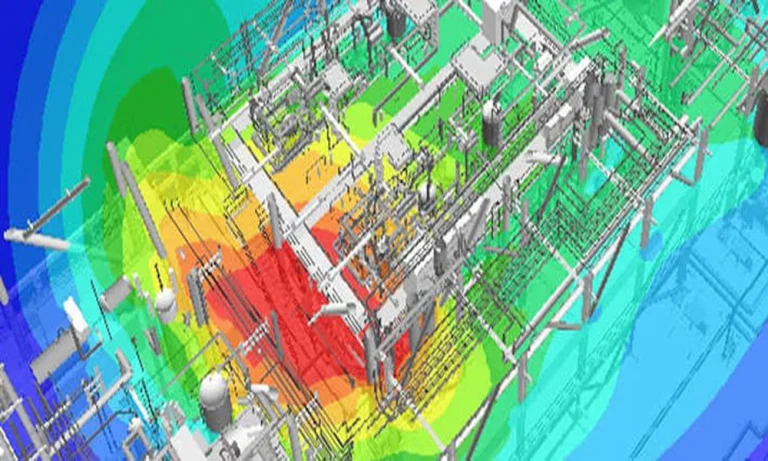
Computational fluid dynamics has become an important part of modern engineering, helping professionals study fluid behavior, heat transfer, pressure distribution, and other physical processes through numerical simulation. Strong CFD skills allow engineers to move beyond theoretical knowledge and apply engineering principles to practical problems. Developing these capabilities can support more confident analysis, better interpretation of simulation results, and a more structured approach to technical work.

For engineers developing their knowledge, CFD courses can provide a structured path from fundamental concepts to practical simulation workflows. Learning in a progressive manner can help new practitioners understand how physical principles are represented computationally and how different stages of a simulation connect. This foundation is important when moving toward more detailed and demanding engineering projects.

Core Concepts Every New Learner Should Know

A solid understanding of fundamental principles provides the basis for effective CFD work. New learners should become familiar with concepts related to fluid mechanics, conservation of mass, momentum and energy, pressure, velocity, turbulence, and heat transfer. These principles help explain what a computational model is attempting to represent.

Learners should also understand important numerical concepts. Mesh generation, boundary conditions, solver settings, convergence, and result verification are essential parts of a simulation workflow. Understanding the purpose of each element makes it easier to identify potential issues and interpret results appropriately.

Developing Practical Simulation Skills

Practical experience helps transform theoretical knowledge into usable engineering skills. Engineers can begin with relatively straightforward simulation problems before progressing toward models with greater complexity. Preparing geometry, generating an appropriate mesh, defining material properties, establishing boundary conditions, and configuring solver parameters are valuable hands-on abilities.

Post-processing is equally important. Engineers need to examine simulation results carefully and determine whether the outputs are physically reasonable. Comparing results with theoretical expectations, experimental information, or established engineering references can help develop stronger analytical judgment.

Working With More Demanding Computational Projects

As engineers gain experience, they may encounter simulations involving larger computational domains, complex geometries, multiple physical effects, or demanding operating conditions. These projects require careful preparation because small modeling decisions can influence computational requirements and result quality.

Managing more demanding projects also involves understanding computational resources and workflow efficiency. Engineers should learn how to organize simulation files, monitor calculations, assess convergence, and identify unnecessary computational effort. These skills can become increasingly important as project complexity grows.

Continuing Technical Development Over Time

CFD knowledge develops through continuous learning and practical application. Engineering software, numerical methods, computational resources, and simulation techniques continue to evolve, making ongoing technical development valuable for professionals working in this field.

Engineers can strengthen their skills by reviewing new methods, studying advanced simulation topics, working on varied projects, and analyzing the results of previous studies. Documenting modeling decisions and lessons learned can also provide a useful reference for future work. Combining foundational knowledge with regular hands-on experience allows engineers to develop a deeper and more adaptable understanding of computational fluid dynamics over time.


Mobile operation trailers offer organisations mobile workspaces that can be set up where they are needed more than ever. They can assist with emergency response, public safety, event management, utilities, construction or any other field operations. These trailers need to be designed around the teams that use them to be effective. With careful consideration, communications, coordination, and decision-making may be enhanced in challenging settings.

To achieve peak performance during critical missions, taking a strategic approach to Designing Mobile Operations Trailers Smarter ensures every square foot serves a clear functional purpose. Rather than relying on generic, off-the-shelf configurations, custom-tailored command units prioritize user workflow, seamlessly balancing ergonomic spacing with technical functionality. By focusing on intentional layout choices and operational priorities from the outset, organizations can bridge the gap between temporary field deployment and long-term operational resilience.

Start from Operational Requirements

The design process should begin by determining the uses for the trailer. Various combinations of workstations, communications systems, storage areas, meeting rooms and technical equipment are required depending on different operations. Gaining an understanding of the mission will ensure that the final design will serve true operational needs, rather than having unnecessary features.

Develop an efficient interior layout.

Inside should be comfortable for people to work and be able to communicate with each other. The layout of workstations, displays, equipment racks, storage areas and collaboration spaces should be logical. A good organisation can minimise the need for unnecessary travel and provide expedient access to key information in the team.

Support Reliable Connectivity

Teams in the field frequently have to communicate with other people in the trailer, or other personnel outside the trailer. The mobile operations trailers will therefore need to have access to a reliable internet system, radio system, cellular coverage, satellite communications or other network solutions. Making effective communications flexible can ensure that team members stay connected, even across great distances.

Plan for Power and Climate Control

Technology and workers need to be able to operate reliably in a comfortable working environment. Power systems should be sized to accommodate any required equipment, and backup should be provided to run the system during outages. For extended periods of field use, effective heating, cooling, ventilation and insulation are also significant.

Integrate Technology Thoughtfully

Technology should facilitate – not complicate – coordination. Displays, mapping tools, data systems, video feeds and communication equipment should be combined in a way that allows the information to be readily available and accessible. Future changes to operational requirements should also be permitted by systems.

mobility and deployment.

A mobile operations trailer should be easily moveable, positionable, and set up. During design, several factors need to be taken into account, including weight, towing requirements, access, stabilisation and deployment time. Efficient deployment enables teams to start operating faster.

Focus on durability & security

Trailers and equipment can be put under harsh conditions in the field. Robust building structure, weatherproofing, safe storage and access control can be used to help keep people and technology safe. The characteristics are essential for long-term trustworthy operation.

Conclusion:

In the end, a mobile operations trailer for smarter field coordination is all about mobility, technology, comfort, and simplicity. Operational needs analysis, designing efficient layouts, facilitating reliable connectivity, and addressing dynamic conditions in the field, to facilitate the creation of mobile workspaces that enhance coordination and decision-making across the board.

The remote-controlled mower market has expanded enough that the choice between models is no longer straightforward. Entry-level options sit alongside professional-grade machines at prices that vary by several hundred percent, and the specifications that matter most are not always the ones that get the most attention in product descriptions. Understanding what actually affects the real-world performance of an RC mower helps you make a decision you will not regret after the first few sessions.

This guide covers the specifications that matter, the features that are genuinely useful versus those that sound impressive but rarely make a practical difference, and the questions worth asking before committing to a purchase. Whether you are looking at your first RC mower or upgrading from a model that has not quite met your expectations, the principles here apply across the category.

Drive System and Traction

The drive system is the most important technical specification for an RC mower, and it is the one most commonly underweighted by first-time buyers who focus on cutting width or battery capacity instead. A mower with a weak or poorly designed drive system will struggle with any meaningful slope, lose traction in damp conditions, and require more operator input to maintain a straight line than a well-engineered alternative.

Four-wheel drive systems provide the best all-terrain capability. Two-wheel drive rear models work adequately on flat terrain but show their limitations quickly on slopes above a few degrees. For gardens with significant gradient variation, four-wheel drive is worth the premium. For genuinely flat terrain, two-wheel drive is often adequate and may offer a cost advantage worth taking.

Cutting Deck and Width

A wider cutting deck reduces the number of passes needed to cover a given area – which sounds straightforwardly good but comes with tradeoffs. Wider decks are heavier, which affects maneuverability on slopes and around obstacles. They are harder to fit through narrow gaps. And they require more motor power to drive effectively, which affects battery consumption and runtime.

For most residential lawns, a cutting width in the 16 to 22 inch range represents a practical balance. Larger properties benefit from wider decks, but the width should be matched to the actual terrain and the obstacles you regularly navigate. A remote control lawn mower that cannot get through your garden gate is solving the wrong problem.

Control Range and Signal

The published control range of an RC mower is the maximum distance under ideal conditions – open terrain with no interference. Real-world range in a garden with walls, fences, trees, and other signal-absorbing obstacles will be shorter. For most residential applications, a range of 100 to 150 metres in real conditions is more than adequate. For larger properties, verify that the control system maintains reliable connection at the distances you actually need.

Signal quality and response lag matter more than raw range. A mower that responds instantly and precisely at 50 metres is more useful than one that reaches 200 metres but has noticeable input lag. Input lag affects precision in tight manoeuvres and makes navigating around obstacles more frustrating.

Maintenance Requirements

Like any mowing equipment, an RC lawn mower requires regular maintenance to stay in good working order. Blade condition affects cut quality and motor load. Battery care affects longevity. Drive system components need periodic inspection. Before purchasing, check the availability of replacement parts and the accessibility of the components that need regular attention. A mower that is difficult to service independently and has expensive or hard-to-source parts creates ongoing costs that the purchase price does not reflect.

Fintech dashboards serve users who are monitoring positions, reviewing transaction data, and acting on time-sensitive information within a single session. Each of those tasks places specific demands on how the interface organises, presents, and responds to data. A user interface agency for fintech opens a dashboard redesign by identifying which of those demands the current interface meets and which it leaves unresolved. Prioritisation in a dashboard redesign is a sequencing decision. Hierarchy is addressed before layout. Density is calibrated before visual refinement. Interaction states are defined before component styling is finalised.

1. Hierarchy before visuals

Hierarchy in a fintech dashboard is not a layout preference. It is a map of what users need to see first, second, and on demand. Dashboard surfaces where critical account data, transaction status, and alert conditions compete for equal visual weight force users to scan rather than act. Resolving hierarchy means establishing a clear order of visual priority based on how users move through tasks during a session. Task sequence analysis determines which data points sit at the top level of the hierarchy and which are placed behind navigation. A redesign that sets this order correctly reduces the time between a user arriving at the dashboard and taking an informed action.

2. Density and precision

Density in a fintech dashboard is a direct product of how many data points each user role requires at one time. A dashboard carrying data for multiple user types on a single surface presents each of them with content they do not need alongside content they do. Calibrating density means mapping role-specific data requirements and structuring the surface so each user type encounters only what their tasks demand. Precision applies to how numerical data is displayed. In financial interfaces, figure alignment, decimal handling, and unit consistency are not formatting details. They are the conditions under which users read and act on data accurately.

3. State-driven interaction

State design in a fintech dashboard covers every condition the interface enters beyond its default loaded view. Loading sequences, error responses, empty data conditions, and confirmation feedback each represent a distinct interface state that users will encounter during regular use. Designing these states against the specific conditions that trigger them ensures users receive accurate feedback at every point in the session. Fintech users encountering an undesigned or inconsistent state during a transaction or position review do not distinguish between an interface problem and a data problem. A user interface agency for fintech resolves this by treating each state as a named design output with defined visual behaviour, not as a residual condition handled after primary screens are complete.

4. Component coherence

Component behaviour across a fintech dashboard determines how quickly users can build a working model of the interface. When filters, toggles, tables, and action elements behave consistently across every section of the dashboard, users learn the interface once and apply that understanding everywhere. When they behave differently, users carry uncertainty into every interaction.

Coherence is evaluated at the system level before individual components are finalised. Spacing, typographic weight, interactive states, and feedback patterns are assessed across the full dashboard surface rather than reviewed section by section. A user interface agency for fintech treats component coherence as a structural output of the redesign process, one that determines how confidently and accurately users engage with the dashboard across every session it is used.