Category

Tech

Category

Most video AI demos stop at a caption, transcript, or short summary. That is not enough when an engineering team needs media data to power search, automation, review queues, recommendations, or VideoRAG. VectorMethods approaches the problem as infrastructure: raw video, audio, and images are transformed into structured intelligence that applications can query, validate, and route.

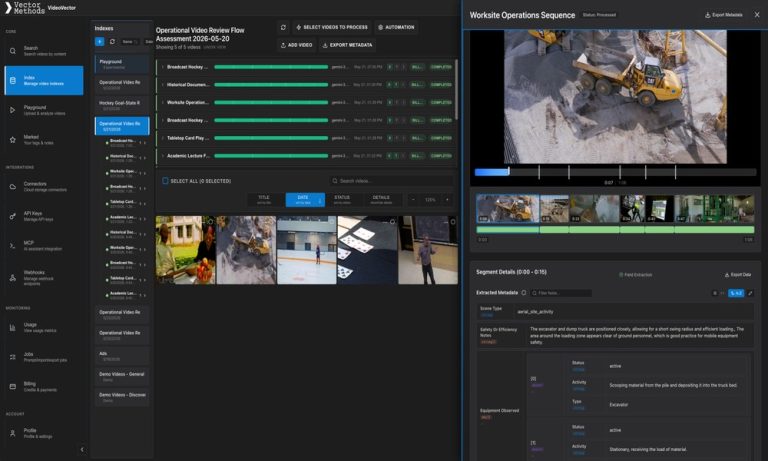
The core capability is LLM-based video extraction through the VideoVector platform. Instead of returning one generic paragraph about a file, VideoVector extracts time-stamped metadata, nested JSON, asset-level analysis, and search-ready descriptors. The result is useful for video scene extraction, video segment analysis, AI metadata extraction, and downstream pipelines where stable field names matter.

Consider an archive workflow. A single historical clip can contain spoken language, translated context, people, places, production cues, scene type, visual quality, and catalog descriptors. A transcript alone cannot capture that structure. With video metadata extraction, each moment can become a structured record: scene type, language, translation, visible entities, archival descriptors, search terms, and source timestamp.

The same pattern applies to operational footage, sports broadcasts, lectures, product videos, security media, and entertainment catalogs. A worksite video can expose equipment activity, safety states, process phases, and risk observations. A sports clip can expose play state, athlete visibility, highlight candidates, camera view, and editorial tags. A lecture can expose concepts, equations, board content, prerequisite ideas, and study notes.

The important technical detail is that extraction is not only file-level. VideoVector supports time-stamped segment outputs and asset-level synthesis. Segment outputs preserve source alignment, so an application can show the user the exact moment behind a field. Asset-level outputs consolidate the whole file into a canonical media record. This combination is especially useful for VideoRAG and MediaRAG systems, where retrieval needs both precise source anchors and broader context.

Schemas make the extraction programmable. With schema-aware video metadata extraction, teams can define the JSON shape they need instead of accepting a fixed vendor taxonomy. That means extracted outputs can be validated, stored in a database, indexed into search, sent to a webhook, or consumed by an internal API.

Once media is extracted, it becomes searchable. Time-stamped fields, asset descriptors, and metadata text can feed multimodal media search, vector search for video scenes and events, structured filters, SQL workflows, and agentic retrieval. The same extracted metadata can support human review, customer-facing discovery, archive search, recommendation systems, and automated media operations.

For technical teams, the shift is straightforward: video should not remain an opaque blob. LLM-based video extraction turns media into typed, time-aware records. VideoVector makes that process repeatable across media types, schemas, and downstream systems.

Denon has built a reputation across the audio and home theater equipment market that few competitors can match, and that reputation rests on products that owners often keep for years or even decades. From AV receivers to amplifiers and turntables, the Denon lineup covers a wide range of needs for audiophiles and home theater builders. But owning a Denon product well requires more than just unboxing it and pressing the power button. The features that justify the purchase are frequently buried in settings, modes, and procedures that only become clear when you actually read the documentation. This guide is written for audiophiles and home theater builders who want to get the most out of their Denon equipment in 2026 – covering setup, common questions, maintenance, and the practical knowledge that turns a capable product into one that genuinely serves you for the long term.

Understanding the Denon Product Lineup

The Denon catalog spans several distinct product families, and knowing which category your specific device belongs to is the first step toward using it well. Denon produces AV receivers, amplifiers, turntables, soundbars, and headphones, each with its own documentation and its own quirks. Within each of these families, Denon releases multiple models and generations, and the differences between them matter more than newcomers often assume. A feature available on one model may be absent on another that looks nearly identical. Settings menus differ between generations. Replacement parts are rarely interchangeable across the full range. This is why identifying your exact model number – usually printed on a label on the device itself – is the single most important thing you can do before looking up any documentation or troubleshooting any problem with your Denon AV receiver.

Getting Started: First-Time Setup

The initial setup of any Denon product determines how well it serves you over its entire lifespan, which is why it deserves more attention than most people give it. For audio and home theater, the most important early step is receiver speaker setup, which the documentation walks through in detail. Skipping or rushing this stage is the most common reason owners end up frustrated with products that are actually working exactly as designed. Take the time to follow the documented setup sequence in order rather than improvising – Denon engineers structured the process deliberately, and the steps build on each other. Pay particular attention to audio calibration and HDMI configuration, which are the two areas where new owners most frequently make mistakes that affect performance for months afterward. A careful first-time setup, following the manual rather than guessing, pays back across the entire ownership period.

Common Questions and How to Resolve Them

Every product category has its recurring questions, and Denon AV receivers are no exception. The most frequent issues owners encounter involve receiver speaker setup, network streaming setup, and remote programming – none of which is a defect, and all of which are addressed clearly in the product documentation. Rather than searching scattered forums for partial answers, the most reliable approach is to consult the manual for your exact model, where Denon documents the correct procedures and any model-specific considerations. You can Denon manuals for your specific device and find the troubleshooting section, which typically appears toward the end of the document. Many problems that seem serious – error messages, unexpected behavior, features that appear not to work – turn out to have simple documented solutions that take minutes to apply. Keeping a digital copy of your Denon manual saved and accessible means that the next time a question comes up, the answer is seconds away rather than requiring another search from scratch.

Maintenance That Extends Denon Lifespan

Denon products are generally built to last, but their actual lifespan depends heavily on the maintenance they receive. Regular care is the difference between a Denon AV receiver that works reliably for a decade and one that fails prematurely. The documentation specifies maintenance intervals and procedures for each model, and following them is far cheaper than dealing with the failures that neglect eventually causes. Key maintenance tasks for audio and home theater typically include HDMI configuration, remote programming, and routine cleaning according to the manufacturer’s guidance. None of these tasks takes long, but they need to be done on schedule rather than only when something goes wrong. Owners who establish a simple maintenance routine – guided by the manual rather than guesswork – consistently report fewer problems and longer service life from their Denon equipment than those who take a purely reactive approach to upkeep.

Unlocking the Full Range of Features

Most Denon owners use only a fraction of what their devices can actually do. The AV receivers and amplifiers in the Denon range include capabilities that never become obvious from the physical controls alone – they’re documented in the manual but invisible to anyone who doesn’t read it. For audiophiles and home theater builders, this means that the premium paid for a quality Denon product often goes partly unused. Spending an evening with the complete documentation reveals modes, shortcuts, and configuration options that can meaningfully change how useful the device is day to day. Whether it’s advanced settings for audio calibration, optimization options that improve performance, or convenience features that simply make the product easier to live with, the manual is where this value is unlocked. The difference between an owner who reads the documentation and one who doesn’t is often the difference between getting full value from a Denon purchase and leaving much of it on the table.

Knowing When to Seek Professional Service

Part of owning Denon equipment well is knowing the boundary between problems you can solve yourself and those that require professional attention. The documentation usually distinguishes clearly between user-serviceable issues and those that need a qualified technician. For audio and home theater, simple matters like receiver speaker setup and network streaming setup are well within the reach of most owners following the manual. More complex problems – internal component failures, electrical faults, or anything involving disassembly beyond what the manual describes – are best left to authorized service. Attempting repairs beyond your skill level not only risks making the problem worse but can void any remaining warranty coverage. The manual’s warranty section spells out exactly what’s covered and what actions might void that coverage, which is worth reading before attempting any significant repair on a Denon AV receiver.

Getting the Most From Long-Term Denon Ownership

Owning a Denon product for the long term is a relationship that rewards a little ongoing attention. The owners who report the highest satisfaction are those who set their devices up carefully, maintain them on schedule, learn their full feature sets, and keep the documentation accessible for the inevitable questions that arise over years of use. For audiophiles and home theater builders, a Denon AV receiver is often a significant purchase, and treating it as such – rather than as a disposable item – produces the best return on that investment. Save a digital copy of your manual in a folder you won’t lose, note your model number somewhere accessible, and treat the documentation as the ongoing reference it was designed to be. Done this way, a quality Denon product becomes one of the more reliable things in your home or workspace, delivering value across many years rather than disappointing through preventable problems.

– – – – – – – – – –

In today’s digital economy, businesses are under constant pressure to move faster, reduce operational costs, and deliver better customer experiences. This is exactly why AI Automation has become one of the most important technologies for companies across every industry. From startups to large enterprises, organizations are using intelligent automation to simplify repetitive tasks, improve productivity, and unlock scalable growth.

As artificial intelligence continues to evolve, businesses are no longer asking whether automation is necessary. Instead, they are asking how quickly they can implement it effectively and gain a competitive advantage.

What Is AI Automation?

AI Automation combines artificial intelligence with automated workflows to perform tasks that traditionally required human effort. Unlike standard automation, which follows fixed rules, AI-powered systems can analyze data, learn patterns, make decisions, and improve over time.

This allows companies to automate more complex processes such as:

• Customer support conversations
• Lead qualification and sales workflows
• Content generation and data analysis
• Scheduling and administrative tasks
• Internal communication processes
• Marketing optimization
• Document processing and reporting

The goal is not to replace human creativity or strategic thinking. Instead, AI automation removes repetitive manual work so teams can focus on higher-value activities.

Why Businesses Are Investing in AI Automation

Companies that adopt AI Automation early often gain a major operational advantage. Automation reduces bottlenecks, increases speed, and helps teams achieve more with fewer resources.

One of the biggest benefits is efficiency. Employees spend countless hours every week on repetitive tasks such as copying data, answering common questions, managing spreadsheets, or organizing workflows. AI-driven systems can handle these activities instantly and consistently.

Another major advantage is scalability. A growing business often struggles to maintain quality while handling larger workloads. AI automation allows organizations to scale operations without dramatically increasing staffing costs.

Businesses also benefit from:

• Faster response times
• Improved customer satisfaction
• Reduced human error
• Better decision-making through data analysis
• Lower operational costs
• Increased team productivity

These advantages make automation especially valuable in competitive industries where speed and efficiency directly impact revenue.

AI Automation in Customer Service

Customer support is one of the most common areas where AI Automation delivers immediate value. AI-powered chat systems can answer frequently asked questions, route conversations, and assist customers 24/7.

Modern AI systems are significantly more advanced than traditional chatbots. They can understand context, recognize customer intent, and provide more natural interactions. This creates a smoother customer experience while reducing pressure on support teams.

Businesses using AI automation in customer service often see:

• Shorter wait times
• Higher ticket resolution rates
• Lower support costs
• Improved customer retention

Human agents can then focus on complex or sensitive cases while AI handles repetitive inquiries.

Marketing and Sales Automation with AI

Marketing teams are increasingly using AI Automation to optimize campaigns and improve lead generation. AI tools can analyze customer behavior, personalize messaging, and automate outreach strategies.

Sales teams also benefit from automation by identifying high-quality leads, prioritizing opportunities, and streamlining communication. Instead of manually tracking every interaction, AI systems can provide intelligent recommendations and automate follow-ups.

Examples include:

• Personalized email sequences
• Automated CRM updates
• AI-generated marketing content
• Lead scoring systems
• Predictive customer analysis
• Automated reporting dashboards

This creates a more efficient sales process while improving conversion rates.

AI Automation for Internal Operations

Internal business operations often contain hidden inefficiencies that consume time and resources. AI-powered automation helps organizations streamline workflows across departments.

Human resources teams can automate onboarding processes and employee communication. Finance departments can simplify invoicing and reporting. Project managers can automate task tracking and scheduling.

By removing repetitive work, businesses create faster internal systems and reduce operational friction.

Companies that embrace AI Automation often notice improvements in:

• Team collaboration
• Workflow transparency
• Operational consistency
• Resource allocation
• Employee satisfaction

Automation also reduces burnout caused by repetitive administrative tasks.

The Future of AI Automation

The future of business will be heavily shaped by intelligent automation. As AI technology becomes more accessible, businesses of all sizes will have opportunities to automate processes that were previously impossible or too expensive.

Organizations that delay adoption may struggle to compete with companies operating faster and more efficiently through AI-powered systems.

Future trends in AI Automation are expected to include:

• More advanced conversational AI
• Fully automated business workflows
• AI-driven strategic decision support
• Hyper-personalized customer experiences
• Real-time predictive analytics
• Seamless cross-platform integrations

The businesses that succeed will be the ones that integrate automation strategically rather than treating it as a temporary trend.

Why RapidLine.ai Is a Smart Choice for AI Automation

Choosing the right automation partner is critical for long-term success. Businesses need solutions that are scalable, intelligent, and tailored to real operational needs.

RapidLine.ai stands out as a modern solution for companies looking to implement powerful AI Automation systems without unnecessary complexity. By helping businesses streamline workflows, optimize communication, and improve operational efficiency, RapidLine.ai enables organizations to work smarter and grow faster.

Instead of relying on disconnected tools and manual processes, companies can build intelligent automation ecosystems that support long-term business growth.

AI Automation is no longer reserved for large technology companies. It has become an essential business strategy for organizations that want to remain competitive in a rapidly evolving market.

From customer support and sales to internal operations and marketing, automation powered by artificial intelligence is transforming how businesses operate. Companies that adopt AI strategically can improve efficiency, reduce costs, and create better customer experiences at scale.

As technology continues to evolve, businesses investing in AI automation today are positioning themselves for stronger growth, greater adaptability, and long-term success in the digital economy.

If you’ve been designing PCBs for a while, you’ve probably hit a point where your 2 layer board starts feeling cramped. Traces are getting tangled, you’re running out of room, and someone in a forum casually mentions “just go 4 layer” like it’s the most obvious thing in the world. But what does that actually mean, and is it the right move for your project?

Here’s a straightforward look at what 4 layer PCBs are, how they’re structured, and how to decide whether your build actually needs one.

The Basics: What Is a 4 Layer PCB?

A standard 2 layer PCB has exactly what it sounds like — a top copper layer, a bottom copper layer, and a fiberglass substrate (called FR4) sandwiched between them. Traces and components live on one or both of those outer surfaces.

A 4 layer PCB adds two internal copper layers buried inside the board. The typical stackup looks like this:

Layer 1 (Top) — Signal traces and components
Layer 2 (Inner 1) — Usually a solid ground plane
Layer 3 (Inner 2) — Usually a power plane
Layer 4 (Bottom) — Signal traces and components

The two inner layers are laminated between sheets of prepreg (a fibreglass/resin material) during manufacturing, creating a single rigid board that looks identical to a 2 layer board from the outside.

Why the Ground Plane Is Such a Big Deal

The single biggest advantage of moving to 4 layers isn’t the extra routing space — it’s the dedicated ground plane, and it matters more than most beginners expect.

On a 2 layer board, your ground connections are stitched together with traces, which creates resistance and inductance across the board. High-frequency signals care about this a lot. Noise creeps in, signals interfere with each other, and debugging becomes a headache.

A solid copper ground plane on Layer 2 gives every component on the top layer an extremely low-impedance return path directly underneath it. This dramatically reduces electromagnetic interference (EMI), improves signal integrity, and makes your power delivery much cleaner. For any board running at meaningful clock speeds or handling sensitive analog signals, this alone can be worth the upgrade.

The Power Plane: Clean Power Delivery

Dedicating Layer 3 to a power plane works on the same principle. Instead of routing power traces around your board — which act like little antennas at high frequencies — every component gets a direct, low-impedance connection to the supply voltage through a via.

This is particularly important for digital circuits with lots of switching activity. Every time a logic gate switches state, it draws a brief spike of current. With a power plane, that current is available almost instantly from directly below the component. Without one, the inductance of a long power trace causes tiny voltage dips — and enough of those across enough components causes unreliable behaviour that’s genuinely difficult to trace back to the root cause.

Pair the power plane with good decoupling capacitors close to your ICs and you’ve got a very solid power delivery network.

More Routing Space (And Cleaner Layouts)

The practical benefit most people think of first is simply having more room to route traces. With two full signal layers plus the ability to use the inner planes for occasional routing where needed, you can dramatically reduce board congestion.

This means shorter trace lengths, less need for vias just to get signals past each other, and cleaner separation between analog and digital sections of your board. That last point is underrated — being able to physically isolate a sensitive analog circuit from a noisy digital one on separate layers, with a ground plane between them, is a real signal integrity win.

When Does a 4 Layer Board Make Sense?

You don’t need 4 layers for everything. A simple LED controller, a basic breakout board, or a low-speed microcontroller project can live perfectly happily on 2 layers. But here are the signs it’s time to move up:

You’re working with high-speed signals. USB, Ethernet, HDMI, DDR memory, anything running at tens or hundreds of MHz — these need controlled impedance traces and good ground planes to work reliably.

You have an RF component. Wireless chips, antennas, and anything transmitting or receiving radio signals need a proper ground plane underneath them. Trying to do RF on a 2 layer board is a recipe for a noisy, low-range mess.

Your board is getting too dense to route cleanly. If you’re spending hours re-routing the same area trying to squeeze everything onto 2 layers, the time you’ll save on a 4 layer board easily justifies the extra cost.

You need clean, stable power. FPGAs, processors, high-speed ADCs, and similar components are sensitive to power rail noise. A dedicated power plane is the cleanest solution.

What Does It Cost?

4 layer boards used to be significantly more expensive than 2 layer boards, but the gap has closed considerably. At popular PCB fabs, a small 4 layer board might cost 1.5x to 2x the price of a comparable 2 layer board — not a dramatic difference for most projects.

The real cost consideration is design time. 4 layer stackups require more thought upfront: defining your layer assignment, planning your via strategy, making sure your inner planes are properly split if you have multiple voltage rails. It’s not difficult, but it’s more work than a 2 layer layout.

A Few Things to Watch Out For

Via planning matters more. Vias that connect to inner planes need to be correctly configured in your design software. Blind and buried vias are possible but add cost — for most projects, standard through-hole vias work just fine.

Plane splits for multiple voltages. If you have 3.3V and 5V rails, your power plane needs to be split into separate regions. Keep the split lines away from high-speed signal areas and make sure your ground plane remains continuous underneath them.

Check your fab’s stackup specs. Layer thickness and prepreg material affect trace impedance. If you need controlled impedance routing, use your fab’s published stackup data and impedance calculators rather than guessing.

The Bottom Line

A 4 layer PCB isn’t just about having more room to route traces — it’s about building a fundamentally better electrical foundation. The dedicated ground and power planes make a real, measurable difference to signal integrity, EMI, and power delivery that no amount of clever 2 layer routing can fully replicate.

If your project is simple and low-speed, 2 layers is fine. But once you’re dealing with fast signals, RF, dense component placement, or sensitive analog circuits, the move to 4 layers is one of the best investments you can make in the reliability of your design.